Join 100,000+ business leaders
Subscribe to get our most-popular proposal eBook and more top revenue content to help you send docs faster.

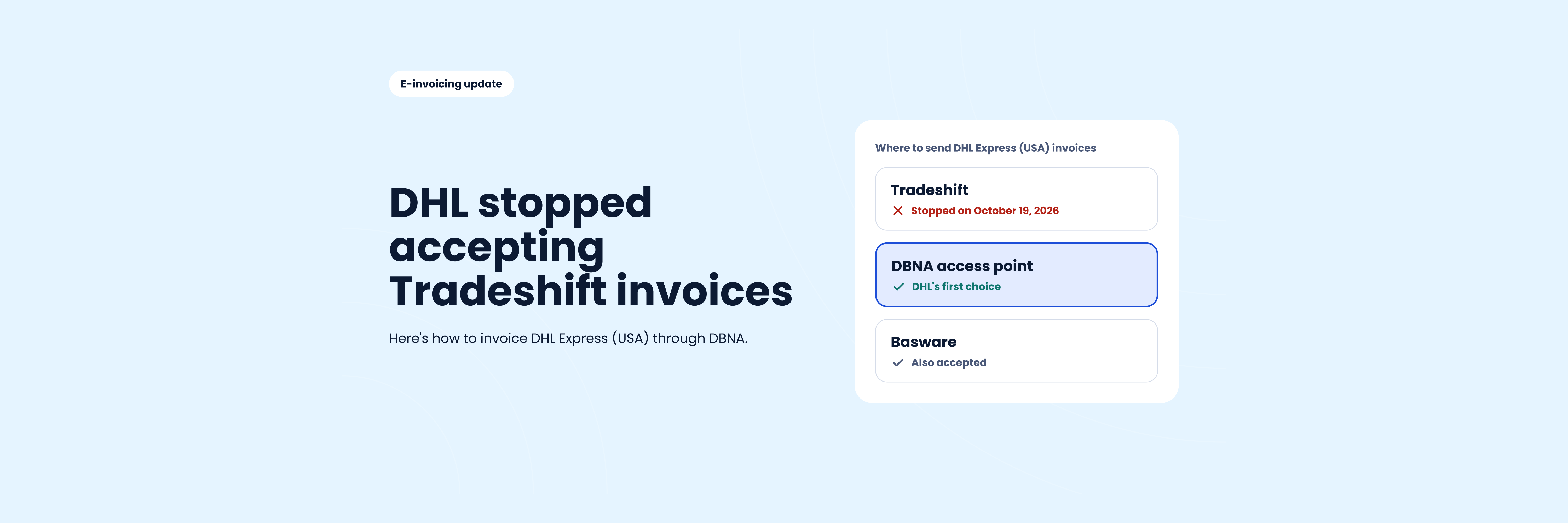


DHL Express (USA) Inc. stopped supporting its Tradeshift connection on October 19, 2026. If you invoice DHL Express in the US, your invoices now need to go through DBNA, DHL's preferred e-invoicing network, or through Basware.
You don't need to build anything or become a network provider yourself. You sign up with a DBNA certified access point, such as DocStudio, and send your invoices through it. Setup takes one short call, and you can start from $9 per user per month.
If you received the "No invoicing through Tradeshift" letter from DHL Express (USA) Inc., it comes down to four points.
If you sent an invoice through DHL's Tradeshift connection after October 19, assume it did not arrive. The fix is simple, but the order matters.
The main risk is duplicates. If the same invoice reaches DHL twice, through different channels, it can slow down payment for both.
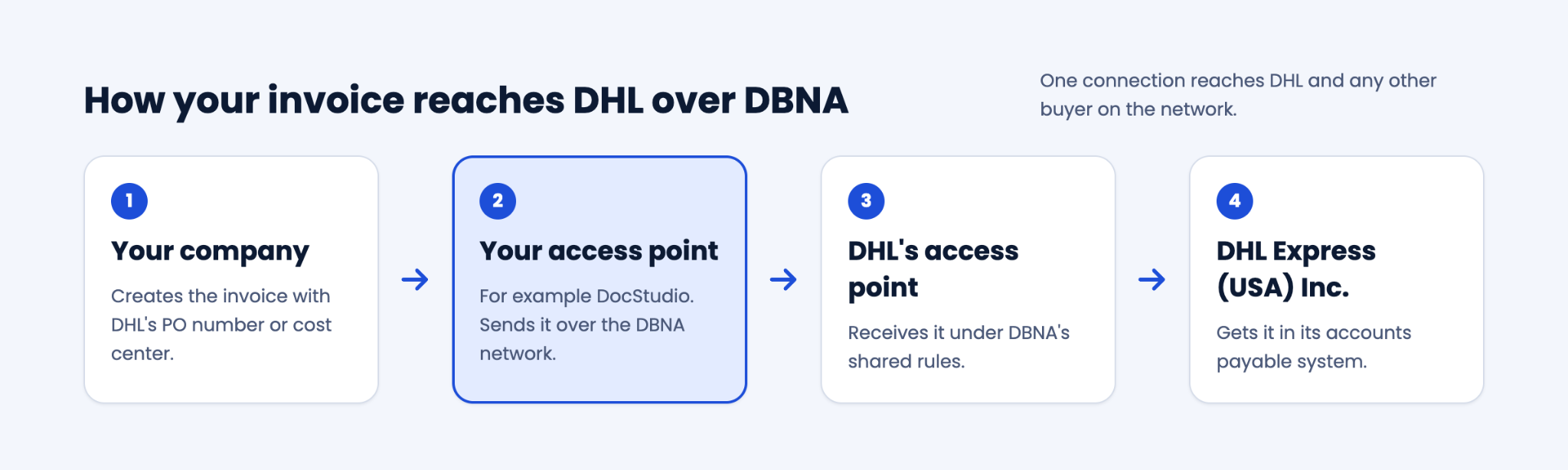
DBNA (Digital Business Networks Alliance) is the network US businesses use to exchange e-invoices and other business documents in a standard electronic format. Companies don't connect to each other one by one. Each company connects to the network through a certified provider, called an access point.
It works like phone carriers. You sign up with one carrier, and you can call anyone on any other carrier. On DBNA, an invoice travels in four hops:
The access points exchange documents under DBNA's shared rules. That's why you only need one connection to reach DHL and any other buyer on the network.
DBNA vs Peppol. DHL's letter mentions both. They are separate networks built on the same design. DBNA serves the US, and Peppol is used mainly in Europe and Asia. To invoice DHL Express (USA) Inc., you use DBNA.
This is the most common point of confusion in DHL's letter. Becoming an access point means getting certified by DBNA and running network connections for other companies. That's work for service providers, not for a carrier or vendor who simply needs to get paid by DHL.
To invoice DHL via DBNA, you only need an account with one certified access point. There's no software to install, no integration to build and no IT team required. If you don't use accounting software, you can type invoices into a web form.
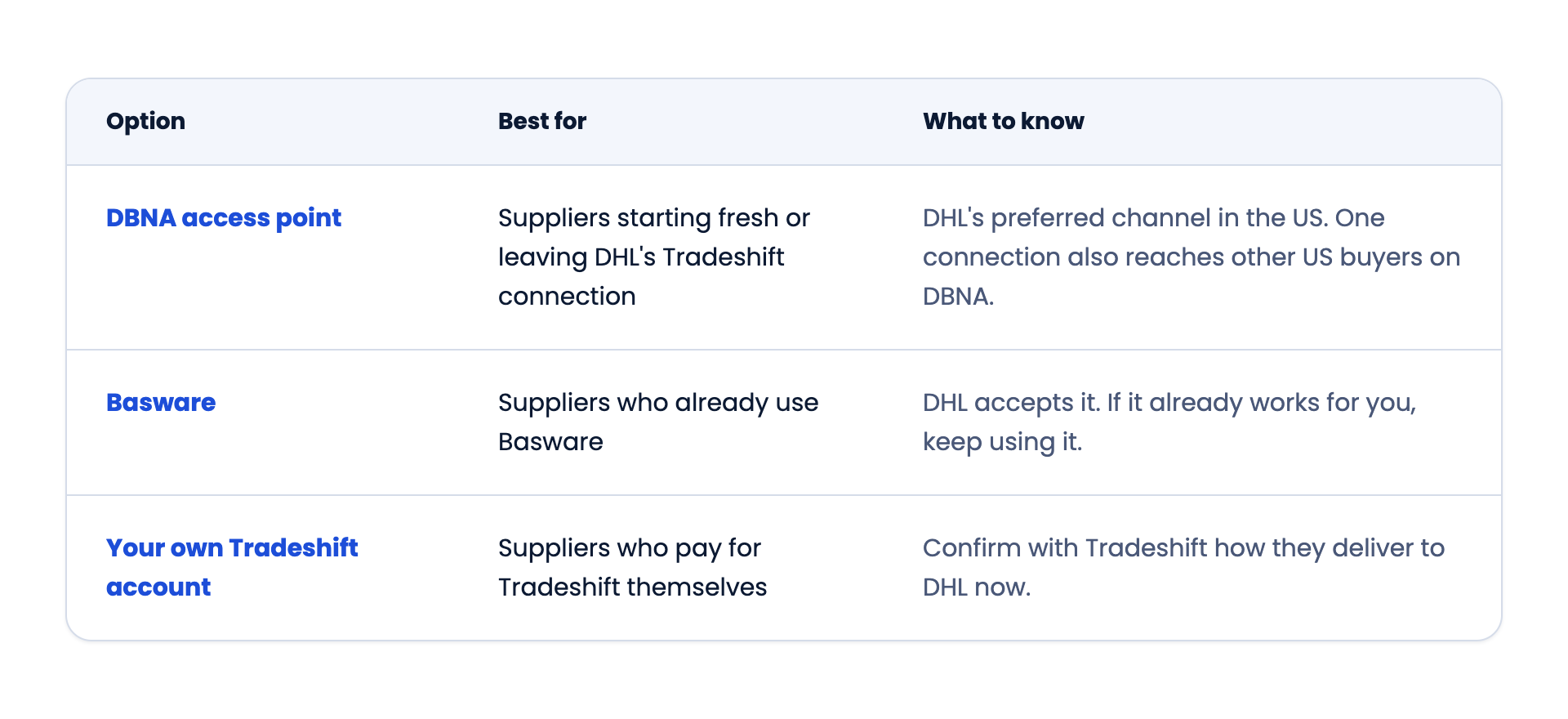
You have three ways to keep invoicing DHL Express (USA) Inc. The right one depends on what you use today.
If you're setting up something new, a DBNA access point is the most direct route, because it's the channel DHL asks for first.
DocStudio is a DBNA certified access point. Switching takes three steps, and a DocStudio representative works with you from the first call.
Our video shows the whole process, from adding DHL as a customer to sending your first invoice.
DocStudio costs $9 per user per month, including up to 50 documents a month. If you send more, see all plans.
Does DHL Express USA still accept invoices through Tradeshift? No. DHL Express (USA) Inc. stopped supporting its Tradeshift connection on October 19, 2026. If you pay for Tradeshift yourself, check with Tradeshift how they deliver to DHL.
How do I send invoices to DHL Express USA now? Through DBNA, DHL's preferred channel, or through Basware. To use DBNA, sign up with a DBNA certified access point such as DocStudio.
What is a DBNA service provider? It's a certified access point that sends and receives e-invoices on the DBNA network for its customers. DHL's letter calls it your "DBNA/Peppol service provider".
Do I have to become a DBNA access point to invoice DHL? No. You only need an account with one certified access point. It delivers your invoices to DHL for you.
Can I still email PDF invoices to DHL? No. Emailed PDFs aren't among DHL's accepted channels, and sending the same invoice by email and over DBNA creates duplicates.
I don't have accounting software. Can I still use DBNA? Yes. With DocStudio, you can type invoices into a web form. Nothing to install, no integration needed.
Is DBNA the same as Peppol? No. They are separate networks with the same design. DBNA is used in the US, and Peppol mainly in Europe and Asia.
Who do I contact about a specific DHL invoice? DHL's supplier team at servicetosuppliers.US@dhl.com.
If your invoices to DHL Express (USA) Inc. are on hold since the Tradeshift switch-off, we can get you connected over DBNA. Book a 15-minute call, and a DocStudio representative will set up your account and walk you through your first invoice.
DocStudio is a certified access point on the DBNAlliance network. DocStudio is not affiliated with, endorsed by or sponsored by DHL. DHL is a registered trademark of Deutsche Post AG and is used here only to describe DHL Express (USA) Inc.'s published supplier invoicing requirements.